
What is an ATS Resume? | ATS Resume Meaning Explained
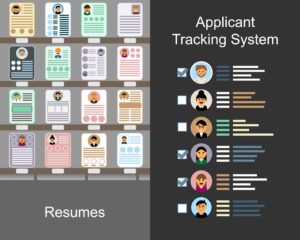
ATS resume means a resume that is created in a way that a computer can easily read and understand. To clearly understand the ATS Resume Meaning, think of it as a resume specially prepared to pass recruitment software screening.
ATS stands for Applicant Tracking System. It is a software used by companies to manage job applications.
So in simple words:
An ATS resume is a resume designed to pass through resume screening software.
If your resume is not ATS-friendly, it may get rejected before any HR person even sees it.
What is an Applicant Tracking System? | Understanding ATS Resume Meaning

An Applicant Tracking System (ATS) is recruitment software that companies use to manage and filter job applications. To better understand the ATS Resume Meaning, you first need to understand how this system works.
Companies use ATS to:
-
Collect job applications
-
Scan resumes
-
Search for keywords
-
Shortlist candidates
-
Reject unsuitable profiles automatically
Today, most large companies, MNCs, and even many mid-sized companies use ATS to save time.
Imagine a company receiving 500 resumes for one job opening. HR cannot read all of them manually. So the ATS helps filter them quickly and efficiently.
How Does ATS Work?
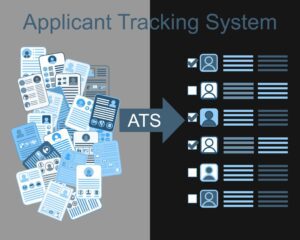
The process is simple:
-
You apply for a job online.
-
Your resume goes into the ATS software.
-
The system scans your resume.
-
It checks for specific keywords from the job description.
-
It ranks your resume based on matching keywords.
-
The recruiter sees only the top-ranked resumes.
If your resume does not contain the right keywords, it may get filtered out automatically.
Why is an ATS Resume Important?

Because if your resume does not pass the software, it will never reach the recruiter. This is where understanding the ATS Resume Meaning becomes very important.
You might be qualified.
You might have a good experience.
You might have the right skills.
But if your resume format is wrong, the system may not read it properly.
That is why creating an ATS-friendly resume is very important in today’s job market.
What Makes a Resume ATS-Friendly?
Here are the most important things:
1. Simple Format
Keep your resume clean and simple.
-
Use basic fonts like Arial, Calibri, or Times New Roman
-
Avoid graphics and images
-
Do not use fancy designs
-
Avoid multiple columns
Simple resumes work better than heavily designed templates.
2. Use Proper Headings
Always use standard headings like:
-
Professional Summary
-
Skills
-
Work Experience
-
Education
-
Certifications
Do not use creative headings like “My Journey” or “My Story.” The ATS may not understand them.
3. Add Relevant Keywords
This is the most important part.
Carefully read the job description and identify:
-
Required skills
-
Tools and software
-
Certifications
-
Industry terms
If the job description mentions “Vendor Management” and “Inventory Control,” these exact words should appear naturally in your resume.
But do not stuff keywords unnaturally. Write them properly within your experience.
4. Use Reverse Chronological Format
Always mention your latest job first.
This is the most accepted and ATS-friendly format.
5. Use Correct File Format
Best formats:
-
DOCX (most recommended)
-
Simple text-based PDF
Avoid:
-
Scanned PDF
-
Image files like JPG or PNG
The ATS cannot read image-based resumes properly.
ATS Resume vs Normal Designed Resume
An ATS resume focuses on structure and keywords.
A normal designed resume focuses more on design and visual appearance.
Heavy design may look attractive to humans, but it can confuse the software.
In most cases, simple resumes perform better in online job applications.
Common ATS Resume Mistakes
Many job seekers make these mistakes:
-
Adding photos
-
Using tables for skills
-
Using text boxes
-
Writing very long paragraphs
-
Missing important keywords
-
Using too many design elements
Keep it clean, clear, and professional.
Simple Structure of an ATS Resume
Here is a basic structure you can follow:
Name
Phone Number | Email | LinkedIn Profile
Professional Summary
Write 2–3 lines about your experience and key strengths.
Key Skills
List relevant skills in bullet points.
Work Experience
Company Name
Job Title
Duration
-
Responsibility or achievement
-
Responsibility or achievement
Education
Certifications
That’s it. No extra design is required.
Final Thoughts
In today’s competitive job market, an ATS-friendly resume is not optional. It is necessary.
Before impressing the recruiter, you must first pass the software.
Remember:
Keep it simple.
Use the right keywords.
Follow a clear structure.
Avoid heavy designs.
If you are applying for jobs and not getting responses, review your resume format. A properly optimised ATS resume can significantly increase your chances of getting shortlisted.
Your resume should not just look good. It should work effectively.