
How to Apply for Jobs on LinkedIn: A Step-by-Step Guide
In today’s digital job market, LinkedIn has become one of the most powerful platforms for job seekers. With millions of job listings and a vast professional network, it offers a streamlined way to discover and apply for opportunities. Whether you’re a recent graduate or a seasoned professional, learning how to apply for jobs on LinkedIn can significantly boost your chances of landing your dream role.
Why Use LinkedIn for Job Applications?

LinkedIn is more than just a networking site—it’s a dynamic job search engine. It allows you to:
- Discover job openings tailored to your profile
- Apply directly through the platform
- Connect with recruiters and hiring managers
- Showcase your skills and experience in real time.
Let’s walk through the two main ways to apply for jobs on LinkedIn.
-
Applying Through LinkedIn’s “Easy Apply” Feature
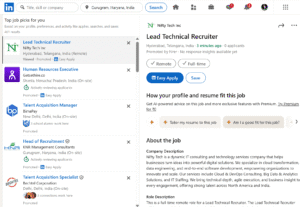
The Easy Apply option is a quick and convenient way to submit your application without leaving LinkedIn.
Step-by-Step Process:
- Search for Jobs
Use the search bar on the LinkedIn homepage or go to the Jobs tab. Enter keywords, job titles, or company names, and filter by location, experience level, and more. - View Job Details
Click on a job title to read the full description, responsibilities, and qualifications. - Click “Easy Apply”
If the job supports Easy Apply, you’ll see a blue button labelled Easy Apply. Click it to start the application. - Complete the Application
Fill in the required fields. You may need to upload your resume, answer screening questions, or provide contact details. - Submit Your Application
Review your information and click Submit. Your application will be sent directly to the employer via LinkedIn.
-
Applying Through the Company’s Website

Some job listings on LinkedIn redirect you to the employer’s official site.
Here’s how:
- Search for Jobs
Just like with Easy Apply, use the search tools to find relevant positions. - Click “Apply”
If the job has an Apply button with an arrow icon, clicking it will take you to the company’s careers page. - Follow the Instructions
Complete the application process as instructed on the company’s website. This may involve creating an account or uploading additional documents.
Tips to Maximise Your Job Search on LinkedIn

To stand out and improve your chances of getting hired, follow these expert tips:
✅ Use Advanced Filters
Narrow down your search using filters like job type, industry, experience level, and remote options.
✅ Consider LinkedIn Premium
Premium users get access to features like Top Applicant, which shows how you compare to other candidates.
✅ Optimize Your LinkedIn Profile
Make sure your profile is complete, with a professional photo, compelling headline, and detailed work experience. Use relevant keywords to improve visibility.
✅ Stay Active on the Platform
Engage with posts, share industry news, and comment on discussions to increase your visibility to recruiters.
✅ Turn on “Open to Work”
Enable the Open to Work feature to let recruiters know you’re actively job hunting.
✅ Follow Up Professionally
If possible, message the hiring manager or recruiter after applying to express your interest and enthusiasm.
FAQs About Applying for Jobs on LinkedIn
Q1: Is LinkedIn’s Easy Apply feature free to use?
Yes, Easy Apply is completely free. You just need a LinkedIn account to use it.
Q2: Can I apply for jobs on LinkedIn without a resume?
Some jobs may allow it, but most require you to upload a resume during the application process.
Q3: What does “Top Applicant” mean on LinkedIn?
It’s a LinkedIn Premium feature that shows jobs where your profile matches well with the job requirements.
Q4: How do I know if my application was submitted?
LinkedIn shows a confirmation message after you click “Submit” via Easy Apply.
Final Thoughts
Applying for jobs on LinkedIn is simple, efficient, and effective—especially when you know how to use the platform strategically. By leveraging features like Easy Apply, optimizing your profile, and staying active, you can significantly enhance your job search success.