
Using the same resume for every job application is one of the most common mistakes job seekers make. In a competitive job market, recruiters receive hundreds of applications for a single position. If your resume doesn’t clearly show that you are the right fit for that specific role, it often gets rejected within seconds.
Customizing your resume for every job application doesn’t mean changing facts or exaggerating your experience. It simply means presenting your skills, achievements, and experience in a way that directly matches the job you are applying for. When done correctly, a customized resume improves your chances of clearing ATS filters, catching a recruiter’s attention, and getting shortlisted for interviews.

This article explains how to customize your resume effectively, step by step, without making the process overwhelming or time-consuming.
Why Customizing Your Resume Is Important
Recruiters don’t read resumes word by word. On average, they spend less than 10 seconds scanning a resume before deciding whether to continue or move on. This is exactly why learning How to Customize Your Resume for Every Job Application is so important in today’s competitive job market.
During that short time, they are asking one simple question: Does this candidate match what we are looking for?

Here’s why resume customization matters:
-
ATS screening: Many companies use Applicant Tracking Systems that scan resumes for specific keywords.
-
Better relevance: A customized resume highlights only what is important for the role.
-
Higher shortlisting rate: Job seekers who customize their resumes get more interview calls.
-
Professional impression: It shows effort, seriousness, and genuine interest in the job.
In today’s hiring process, sending a generic resume significantly reduces your chances.
Step 1: Read and Analyze the Job Description Carefully
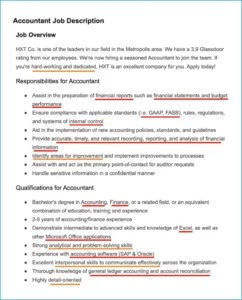
The job description is your biggest clue. Before making any changes to your resume, take time to read it carefully. Understanding the role in detail is the foundation of How to Customize Your Resume for Every Job Application.
Pay close attention to:
-
Core responsibilities
-
Mandatory and preferred skills
-
Tools, software, or technologies mentioned
-
Industry-specific terms
-
Words or phrases repeated multiple times
For instance, if a job description frequently mentions “data analysis,” “stakeholder coordination,” or “process improvement,” these are clear signals of what the employer values most. Your resume should reflect these priorities clearly and consistently.
A simple and effective method is to copy the job description into a separate document and highlight key terms. These highlighted keywords should directly guide how you customize your resume, helping it align better with both recruiter expectations and ATS screening.
Step 2: Know Which Resume Sections to Customize
You don’t need to rewrite your entire resume every time. Focus on the sections that create the most impact:
-
Resume headline
-
Professional summary
-
Skills section
-
Work experience bullet points
-
Key achievements
Customizing these sections is usually enough to make your resume job-specific and ATS-friendly.
Step 3: Customize Your Resume Headline
Your resume headline sits at the top and immediately tells the recruiter who you are. It should closely match the job title you’re applying for.
Generic headline:
“Experienced Professional with 10+ Years of Experience”
Customized headline:
“Senior HR Business Partner with Expertise in Employee Relations and Talent Strategy”
Using the job title or a closely related version improves keyword matching and instantly makes your resume look relevant.
Step 4: Rewrite Your Professional Summary for Each Role
Your professional summary should clearly explain why you are a strong candidate for the specific job.
Keep it:
-
3–5 lines long
-
Focused on job-relevant skills
-
Results-oriented
Before customization:
“Dynamic professional with experience across multiple functions.”
After customization:
“Dynamic HR Business Partner with 12+ years of experience supporting leadership teams, improving employee engagement, and aligning HR initiatives with business objectives.”
The customized version directly connects your experience to the role’s expectations.
Step 5: Update the Skills Section Using Job Keywords
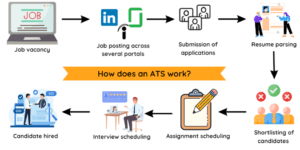
The skills section plays a critical role in ATS filtering. If your skills don’t align with the job description, your resume may never reach a recruiter—no matter how strong your experience is.
Best practices for an effective skills section:
-
Use keywords exactly as mentioned in the job description
-
Remove skills that are not relevant to the specific role
-
Group skills logically, such as Functional Skills, Technical Skills, and Tools & Software
Example:
If a job description highlights skills like Performance Management, HR Analytics, and Policy Implementation, make sure these exact terms appear in your skills section—provided you genuinely have experience in them.
Avoid generic phrases such as “hardworking” or “good communication skills.” Instead, focus on clear, role-specific skills that directly support the job requirements.
Step 6: Customize Your Work Experience Section
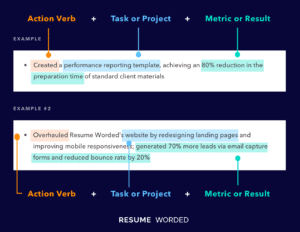
This is where resume customization makes the biggest difference. Rather than listing every responsibility from your past roles, focus on highlighting experience that directly matches the job you’re applying for.
Match Your Experience with Job Requirements
For each position in your work history, ask yourself:
-
Which responsibilities closely align with this role?
-
Which achievements clearly demonstrate the required skills?
Generic bullet point:
“Handled HR-related activities and employee issues.”
Customized bullet point:
“Managed employee relations, grievance handling, and compliance activities for a workforce of 400+ employees.”
Clear, specific, and relevant bullet points make your resume more impactful, easier to scan, and far more appealing to recruiters and ATS systems alike.
Step 7: Use Numbers to Show Impact
Recruiters trust numbers more than general statements. Quantifying your achievements adds credibility.
Examples:
-
“Reduced employee attrition by 15% through engagement initiatives.”
-
“Successfully hired 100+ professionals within a 6-month recruitment cycle.”
-
“Improved process efficiency by 30% by streamlining workflows.”
If exact numbers are not available, use reasonable estimates—but always stay honest.
Step 8: Make Your Resume ATS-Friendly
Even a well-written resume can fail if it isn’t ATS-compatible. Many qualified candidates get rejected simply because their resumes can’t be read properly by Applicant Tracking Systems.
ATS Optimization Tips
-
Use standard section headings such as Summary, Skills, Experience, and Education
-
Avoid tables, graphics, text boxes, and images
-
Choose simple, professional fonts like Arial or Calibri
-
Always follow the file format mentioned in the job posting
Most importantly, include relevant keywords naturally throughout your resume. Avoid keyword stuffing—your resume should read smoothly for humans while still being optimized for ATS screening.
Step 9: Customize Your Resume for Different Industries
If you’re applying to roles across industries, customization becomes even more important.
For example:
-
Corporate roles: Focus on strategy, compliance, and reporting
-
Startup roles: Highlight adaptability, multitasking, and fast execution
-
Consulting roles: Emphasize problem-solving, client interaction, and results
The same experience can be presented differently depending on industry expectations.
Step 10: Maintain a Master Resume
To save time, keep a master resume that includes:
-
All roles and responsibilities
-
All achievements
-
All skills and certifications
For each job application, create a copy and remove or adjust content based on relevance. This approach makes resume customization faster and more efficient.
Common Resume Customization Mistakes
Avoid these common errors:
-
Using the same resume for all job applications
-
Ignoring job description keywords
-
Adding irrelevant experience
-
Writing vague or generic summaries
-
Making the resume unnecessarily long
A focused, relevant resume always performs better than a lengthy generic one.
How Much Time Should You Spend Customizing a Resume?
With practice:
-
Entry-level roles: 20–30 minutes
-
Mid-level roles: 30–45 minutes
-
Senior roles: 45–60 minutes
This small time investment can significantly increase your chances of getting interview calls.
Final Thoughts

Customizing your resume for every job application is one of the most effective job search strategies. It shows recruiters that you understand their requirements and can add value in a meaningful way.
Instead of applying to more jobs with the same resume, focus on applying smarter with a customized one.
When your resume speaks the same language as the job description, your chances of landing interviews—and the right opportunities—increase dramatically.