
In 2026, most companies use Applicant Tracking Systems (ATS) to shortlist resumes before a human recruiter even sees them. If your resume is not ATS friendly, it may get rejected automatically—even if you are perfectly qualified.
This step-by-step guide will help you create an ATS friendly resume in 2026 that gets shortlisted, ranks higher in ATS scans, and increases recruiter calls.

What Is an ATS Friendly Resume?
An ATS friendly resume is a resume that is:
-
Easy for ATS software to read
-
Keyword-optimized for the job role
-
Properly formatted (no design issues)
-
Written in simple, standard language
ATS software scans your resume for keywords, skills, job titles, experience, and formatting. If your resume matches the job description, it moves to the recruiter.
Why ATS Friendly Resume Is Important in 2026
In 2026:
-
95%+ companies use ATS
-
AI-based ATS systems rank resumes automatically
-
Keyword mismatch = rejection
-
Fancy designs reduce ATS score
That’s why learning how to make an ATS friendly resume is a must for job seekers.
Step-by-Step Guide to Make an ATS Friendly Resume in 2026
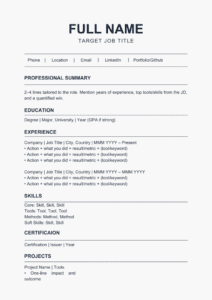
Step 1: Use a Simple Resume Format (Very Important)
Always use a clean and simple resume format.
Best ATS-friendly format:
-
Reverse chronological format
-
One column layout
-
Black text on white background
Avoid:
-
Tables
-
Text boxes
-
Columns
-
Graphics, icons, logos
-
Headers & footers
Step 2: Choose the Right File Type
ATS works best with:
-
.DOCX (Word file) – Highly recommended
-
.PDF – Only if it’s text-based (not image-based)
👉 Best option in 2026: DOCX
Step 3: Use ATS-Friendly Resume Headings
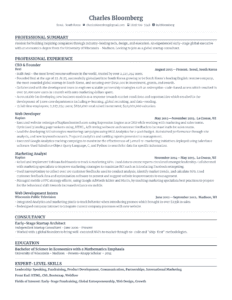
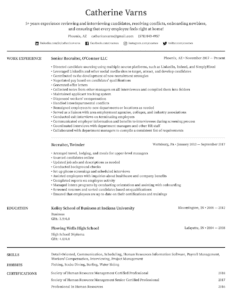
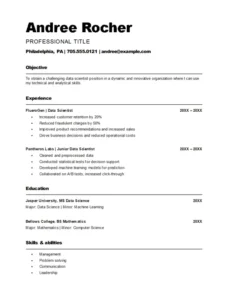
Always use standard headings that ATS easily recognizes:
-
Professional Summary
-
Key Skills
-
Work Experience
-
Education
-
Certifications
-
Projects (if applicable)
❌ Avoid creative headings like:
-
“What I Bring to the Table”
-
“My Journey”
-
“Career Highlights”
Step 4: Write a Strong Keyword-Rich Professional Summary
Your professional summary should be:
-
3–4 lines
-
Keyword focused
-
Role specific
Example:
Results-driven Business Analyst with 8+ years of experience in data analysis, MIS reporting, stakeholder management, and process optimization. Skilled in Excel, Power BI, SQL, and business intelligence tools to drive data-backed decisions.
Step 5: Identify the Right Keywords from Job Description

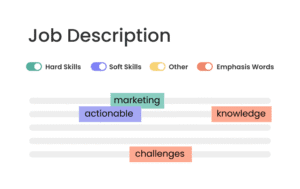
Keywords are the heart of an ATS friendly resume.
How to find keywords:
-
Open the job description
-
Identify:
-
Job title
-
Skills
-
Tools
-
Technologies
-
Certifications
-
-
Use the same keywords naturally in your resume
Example keywords:
-
ATS friendly resume
-
Data analysis
-
MIS reporting
-
Power BI
-
SQL
-
Stakeholder management
👉 Do NOT stuff keywords. Use them naturally.
Step 6: Create a Dedicated Key Skills Section
Add a Key Skills section with bullet points.
Example:
-
ATS Resume Optimization
-
Data Analysis & Reporting
-
Excel, Power BI, SQL
-
Process Improvement
-
Stakeholder Management
This section helps ATS quickly identify your skills.
Step 7: Write ATS-Optimized Work Experience
Use bullet points, not paragraphs.
Best structure:
-
Job Title
-
Company Name
-
Location | Duration
-
Bullet points with action words
Example:
-
Analyzed large datasets to improve operational efficiency by 20%
-
Developed automated MIS dashboards using Excel and Power BI
-
Collaborated with cross-functional teams for business insights
Use numbers wherever possible.
Step 8: Avoid Design Elements That Break ATS
In 2026, ATS still struggles with heavy design.
❌ Avoid:
-
Images & photos
-
Charts & graphs
-
Icons
-
Fancy fonts
✅ Use:
-
Arial, Calibri, Times New Roman
-
Font size 10.5–12
-
Normal bullet points
Step 9: Add Education & Certifications Properly
Use simple formatting:
Education:
-
Degree Name
-
University / Institute
-
Year
Certifications:
-
Certification Name – Issuing Authority
This helps ATS correctly parse your qualifications.
Step 10: Customize Resume for Every Job Application
One resume does NOT fit all jobs.
For best results in 2026:
-
Customize resume keywords for each job
-
Match job title with the JD
-
Rearrange skills based on job priority
Customized resumes get higher ATS scores.
Step 11: Check Your ATS Score Before Applying
Before applying, test your resume using ATS resume checker tools.
They help you analyze:
-
ATS compatibility score
-
Keyword match percentage
-
Formatting issues
Aim for 80%+ ATS score.
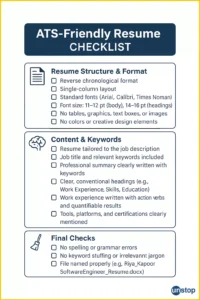
ATS Friendly Resume Checklist (2026)
✅ Simple format
✅ Correct keywords
✅ Standard headings
✅ No graphics or tables
✅ DOCX file
✅ Job-specific customization
Final Thoughts
Creating an ATS friendly resume in 2026 is not about design—it’s about strategy, keywords, and clarity. A well-optimized resume improves your chances of shortlisting, recruiter calls, and interview opportunities.
If your resume passes ATS, recruiters will notice you faster.